

Carlos Bravo
23 October 2026
A new way to upgrade to Ubuntu Pro on AWS
Upgrading existing Ubuntu LTS instances to Ubuntu Pro using AWS License Manager just got better with a new destination license model.
We are happy to announce a new way to upgrade existing Ubuntu LTS instances to Ubuntu Pro in AWS License Manager, using an Ubuntu Pro Marketplace license as destination. You can now perform an in-place conversion to an AWS Marketplace Ubuntu Pro license instead of the legacy EC2 license. Same seamless experience, greater procurement flexibility.
Why is this important for enterprise Ubuntu users?
When upgrading to Ubuntu Pro on AWS, we usually recommend launching fresh instances using pre-activated Ubuntu Pro AMIs. But for many organizations, redeploying infrastructure isn’t a quick or easy option. That’s why over three years ago we introduced in-place upgrades to Ubuntu Pro using AWS License Manager, saving hours of redeployment effort.
Until now, in-place upgrades used standard EC2 licensing. Enterprise customers who wanted private offers, committed spend agreements, or bundled support would need to deploy into a new SKU entirely. The new Marketplace destination solves this: you get the same seamless conversion, but your Ubuntu Pro subscription is procured through AWS Marketplace, unlocking private pricing, volume commitments, and tailored support agreements.
How does it work?
The new destination license model brings important business benefits, without a technical overhaul.
Under the hood, the workflow is almost identical to the legacy method. You initiate the exact same License Type Conversion process inside AWS License Manager; the only difference is the destination license type you choose. Your EC2 instances receive the updated metadata, and Ubuntu Pro automatically activates its security and compliance services on the next boot.
From a business perspective, the shift is significant. Procurement moves from standard pay-as-you-go EC2 billing to a structured AWS Marketplace transaction tailored to your organization’s exact needs.
Key benefits of the Marketplace license
- Private offers and volume pricing: Negotiate custom pricing models and tiered volume discounts directly with Canonical for large-scale deployments.
- Customized support bundles: Attach 24/5 or 24/7 enterprise support directly into your subscription costs.
- AWS EDP burn-down: Purchases count directly toward your AWS Enterprise Discount Program (EDP) commitments.
- Direct partner relationship: Support gets easier because you can establish a direct relationship with Canonical, rather than through AWS.
How to convert your instances
Prerequisites:
- Instances must have AWS Systems Manager (SSM) enabled (visible under Fleet Manager in the SSM console).
- Ability to stop and restart the instances (the full process typically takes up to 15 minutes).
- Network access configured as outlined in the Ubuntu Pro Client network requirements.
Step 1: Stop your instances
Open the EC2 Dashboard and shut down all the instances you plan to convert.
Step 2: Convert the license type
- Open AWS License Manager and select License type conversion from the left navigation menu.
- Click Create license type conversion.
- Select Ubuntu LTS and choose the instances you want to upgrade.
- Click Next, choose Ubuntu Pro License Manager Upgrade (x86/Arm) as the target as your destination license type (Note: Choose Marketplace rather than the standard EC2 metadata license to unlock enterprise pricing options and private offers).
- Review your configuration and click Convert.
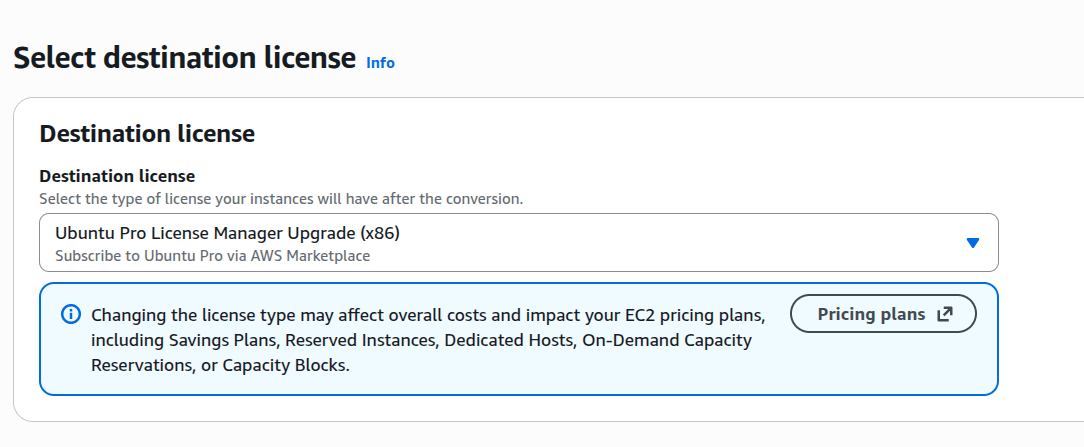
The conversion takes a few minutes. You can monitor progress directly on the License Manager dashboard.
Step 3: Verify the upgrade
Once complete, restart your instances, log in via SSH or SSM, and verify the upgrade status:
pro status
The output will confirm that your instance is actively running Ubuntu Pro with services enabled.


